
Street View 360 Downloader
Download 360° panorama images from Google Street View. Free, fast, no login required.
Supports: Panorama ID, Google Maps URL, and mobile short links (maps.app.goo.gl). You can paste multiple IDs/URLs, one per line.
How to Get a Panorama ID
- Open Google Maps and navigate to Street View.
- Copy the URL from the browser address bar and paste it above.
- You can also find the Panorama ID directly inside the URL: look for the part
!1sPANO_ID!2eand copy that ID. - You can paste multiple IDs/URLs, one per line.
Download Google Street View 360 Panorama Images Free
Street View 360 Downloader is the easiest way to save high-resolution 360° panorama images from Google Street View to your computer. Just paste a Google Maps Street View URL or a Panorama ID into the box above, choose your quality settings, and click Download. Your full equirectangular panorama will be ready in seconds.
No registration, no API key, and no technical knowledge required. Works on any device, any browser.
How to Download Street View 360 Images
Saving a Street View panorama from your desktop takes just a few clicks:
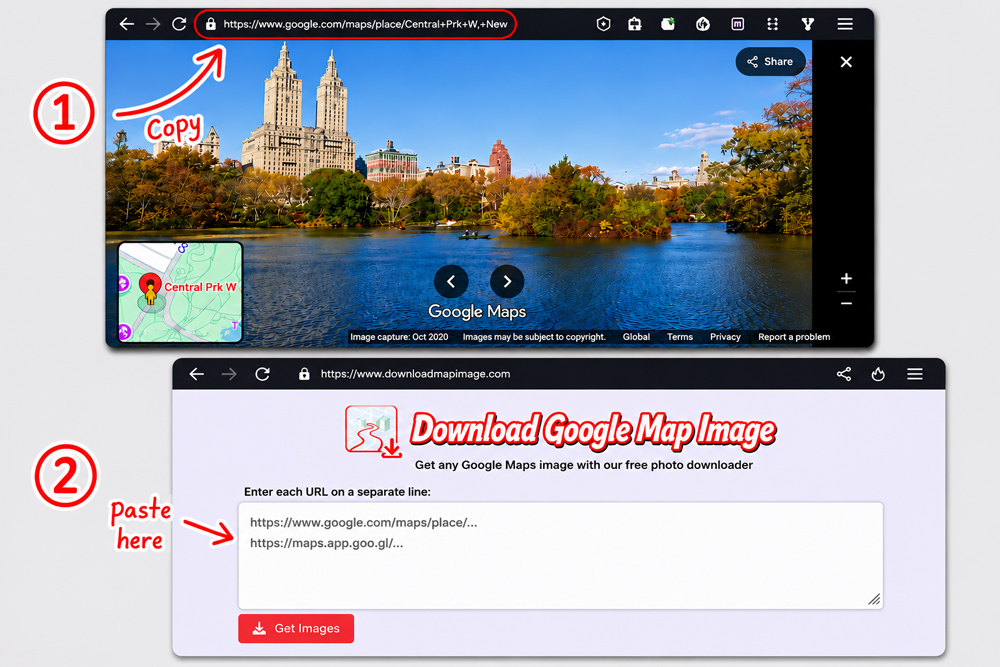
On your desktop or laptop:
- Go to google.com/maps and click on the icon (pegman) on bottom-right of your screen to jump to Street View Mode.
- Click any street to view it in panorama. You can use Search box for the exact 360° panorama you want to download.
- Copy the full URL from the browser address bar.
- Paste it into the input box above and click Download Panorama.
- Your 360° image will be stitched and saved automatically.
On your phone or tablet:
- Open the Google Maps app and find a Street View location.
- Tap the Share icon ( or ) displayed under the 360° panorama. If both a Share icon and a Share button are visible, tap the Share icon.
- Choose Copy link from the share menu.
- Open this page on your browser and paste the link into the box above.
- Tap Download Panorama and wait for the image to be saved.
Why Use Street View 360 Downloader?
- 360° XMP metadata: Optionally embed GPano metadata so your panorama is recognized by VR viewers and social platforms.
- Batch download: Paste several URLs or Panorama IDs at once and download them all in one go.
- Completely free: No account, no subscription, no hidden fees.
- Fast and private: Your URLs are processed directly and not stored on any server.
- High resolution output: Download panoramas at up to 16384x8192 pixels depending on the location.
- JPEG quality: Automatically sets JPEG quality to 100% in the background, so every download comes out at the highest possible quality.
- Multiple zoom levels: Choose from 6 quality levels to balance file size and resolution.
- Real-time progress: Watch tile-by-tile stitching progress as your panorama is assembled.
- Three export formats: Save your panorama as JPEG, PNG, or WebP.
Who Should Use This Tool?
Built for anyone who needs a real panorama file, not just an in-browser view. Common use cases include:
- Everyday users: Save a panorama of your home, street, or neighborhood to share with friends on Facebook.
- Insurance agents & surveyors: Reference street-level panoramas of an address for remote inspections or documentation, without traveling to the site.
- Photographers: Archive panoramas of interesting locations for personal collections or editing, without needing a dedicated 360° camera on site.
- Real estate agents: Download panoramas of a property or its surroundings to embed in listing pages, brochures, or virtual tour software.
- Travel bloggers: Collect high-resolution panoramas of destinations to illustrate travel articles, social media posts, or interactive photo galleries.
- Urban planners & researchers: Gather street-level panoramic imagery for site analysis, urban studies, or before/after comparisons over time.
- VR & app developers: Grab equirectangular panoramas with embedded GPano XMP metadata, ready to use as assets in VR viewers and 360° apps.
- Web developers: Batch-download several panoramas at once by pasting multiple URLs or IDs, useful when building demos, prototypes, or datasets.